
See how a change in assumptions changes your valuation.
English .xlsx workbook · v1.0.0 · Fictional USD example included
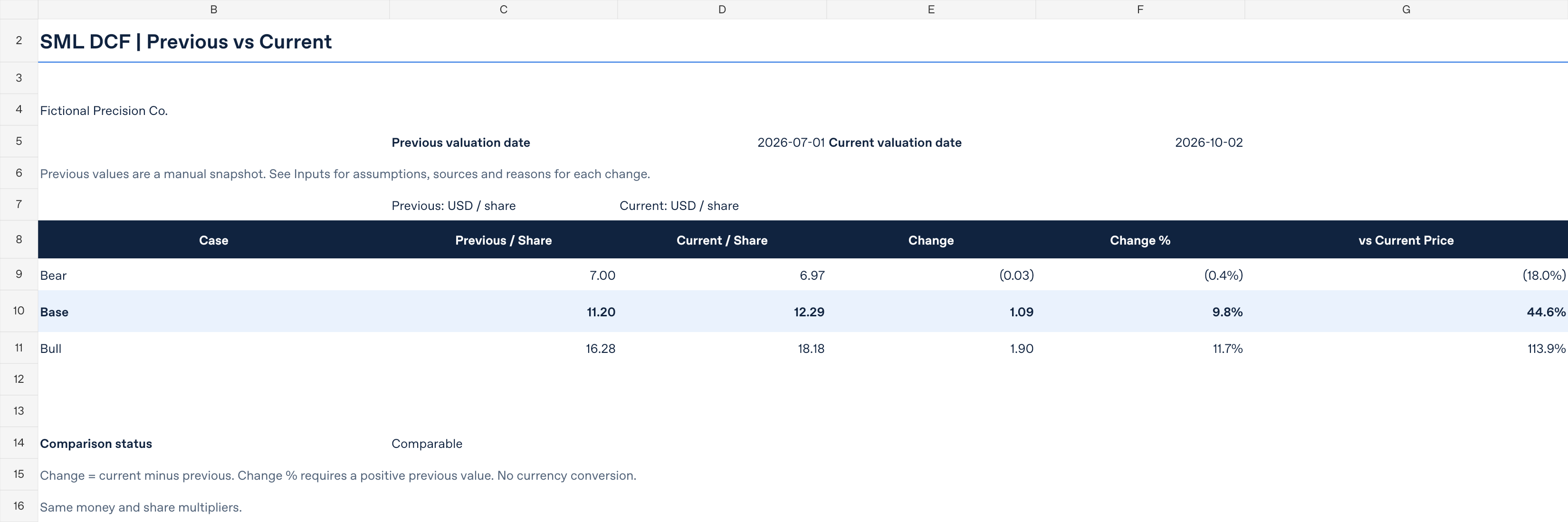
Put your previous and current DCF assumptions side by side. Compare Bear, Base and Bull cases, review enterprise and equity value, and see what changes when WACC moves by one percentage point. Keep source notes and change reasons alongside your inputs so the comparison is easier to explain.
USD 9
One-time purchase. Applicable taxes are added; the total is shown before payment.
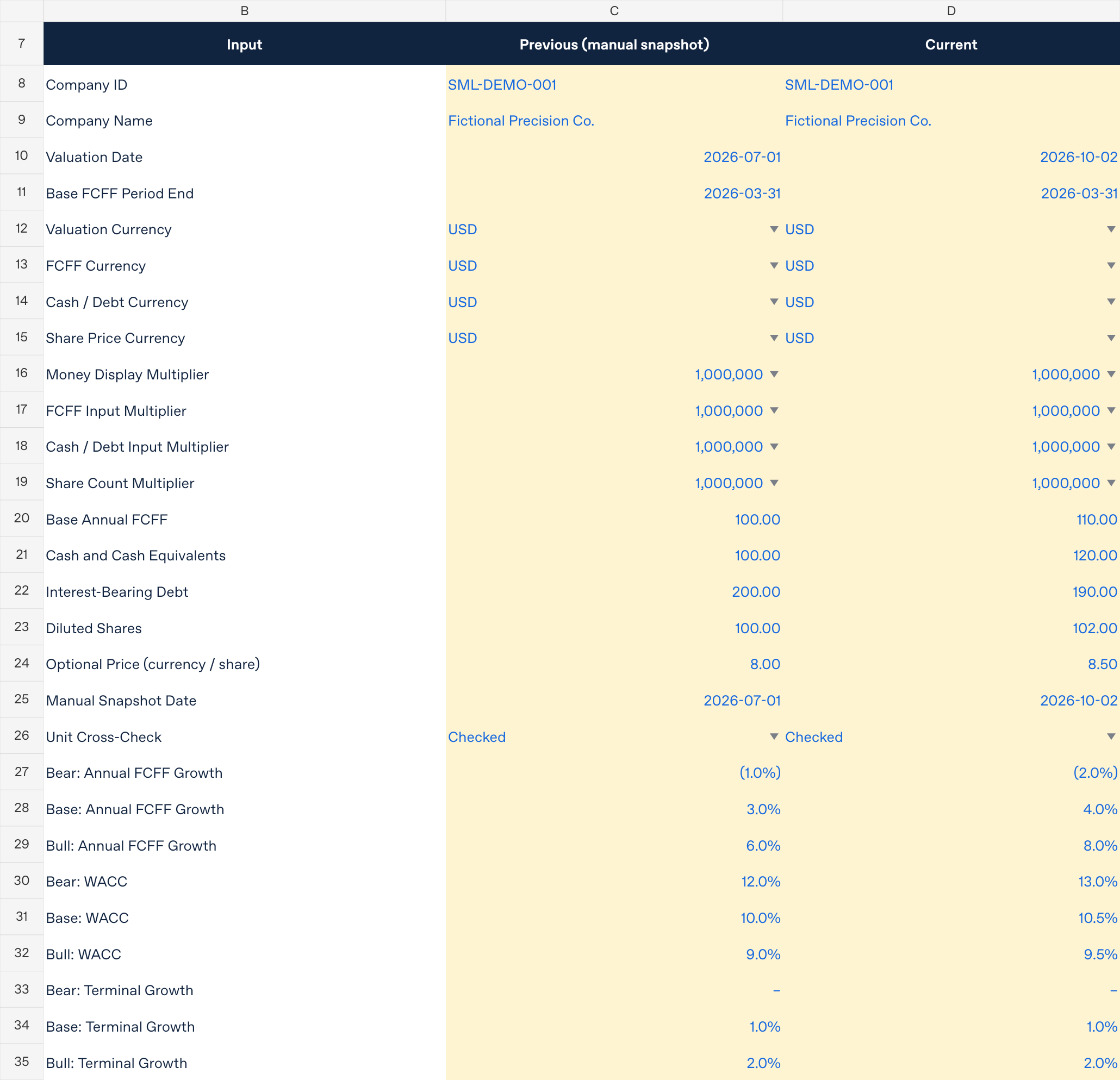
What you will prepare: a positive starting FCFF, your own growth, WACC and terminal-growth assumptions, the equity-bridge figures and share count, plus dates and sources. You enter the data manually and maintain the previous snapshot yourself. The included fictional example and Quick Start explain the workflow.
Payment and delivery
Payment is due in full at checkout, before download access is provided. Payment is processed through PayPal. After successful payment confirmation, Payhip provides immediate access to the ZIP download page and sends a receipt containing the download link. This is a digital product; nothing is shipped and there is no shipping charge.
See the workbook
Previews rendered from the v1.0.0 workbook using its fictional USD example. Layout may vary by spreadsheet application. These figures are not market data or investment recommendations. Select a preview to view it at full size.
Compare previous and current cases
Enter your assumptions
Check WACC sensitivity

Make the comparison clear
- Two snapshots, three scenarios. Review previous and current Bear, Base and Bull assumptions in one workbook.
- Follow the valuation. Inspect a five-year FCFF forecast, terminal value, equity bridge, value per share and WACC sensitivity.
- Keep the context. Record dates, sources and reasons for changes. Visible status checks flag input and comparison issues; protected formula cells help prevent accidental edits.
What is included
The workbook has four sheets: Comparison, Inputs, DCF Calculation and Currency Reference. The download also includes an English Quick Start, input and currency-unit guidance, compatibility and model limits, a README, and the sales terms. The customer ZIP contains six files in total. A fictional example helps you follow the workflow before entering your own data.
For a separate record of the company results behind an assumption review, see SML Earnings Check (USD 9). The Stock Research Workbook Bundle (USD 20) includes this DCF workbook, Earnings Check, the Position Size Planner and the Investment Thesis Notebook.
Manual inputs, clear currency labels
Enter all financial data and assumptions manually. Choose from 154 currency-code labels to label monetary amounts and check consistency. These labels are separate from number-unit multipliers such as units or millions. Changing a currency code does not fetch exchange rates, convert or rescale amounts, or change numeric precision.
There is no automatic market-data import, live company-data or price feed, FX conversion, or automatic history. You maintain the previous and current snapshots yourself.
Tested desktop environments
The unchanged calculation model was tested on 6 October 2026 in Windows Excel 16.0, build 20430 and Windows LibreOffice Calc 7.4.2.3. Automated checks in each native application covered calculations, currency validation and .xlsx save/reopen: 411 cases and seven save/reopen stages passed.
For v1.0.0, only version labels changed. Representative recalculation and save/reopen checks were repeated in both desktop applications on 10 October 2026.
Excel for Mac, Excel for the web, Google Sheets, Ubuntu, mobile apps and other application versions have not been tested on this version. Compatibility with those environments is not claimed. Mouse-driven dropdown use, keyboard interaction with protected cells and physical printing were not tested.
Understand the model
This is an educational scenario-analysis tool with a fixed five-year FCFF forecast and a Gordon-growth terminal value. It requires a positive starting FCFF; zero or negative starting FCFF is not supported. It does not build FCFF from financial statements or calculate WACC for you. Results depend on your inputs and assumptions; they are not personalized investment recommendations or a guarantee of returns.
Learn the method in the free DCF valuation guide, then explore assumptions in the free browser DCF Calculator before choosing a workbook.
Use, refunds and support
This workbook is for your own learning and investment analysis. Personal backup copies are allowed. Sharing, redistribution and resale are prohibited.
A full refund of the purchase price is available on request within 14 days of purchase, for any reason.
Withdraw from contract / request a refund
Basic-use email support is available at research@stockmetriclab.com for 30 days from purchase. Replies may take several business days. This does not include valuing individual companies on your behalf.
Statutory rights relating to defects or non-delivery are not limited by the 14-day refund period or the 30-day support period.
Investment returns and valuation accuracy are not guaranteed.
Seller and contact details
Business name: Stock Metric Lab (SML)
Operator: Shingo Harada
Address: KT Honsha Building 202, 5-40 Ogurachoshindenjima, Uji, Kyoto, Japan 6110042
〒611-0042 京都府宇治市小倉町新田島5-40 KT本社ビル202
Telephone: +81 70-9472-5053 (within Japan: 070-9472-5053)
Email: research@stockmetriclab.com