
Stock Metric Lab · English Excel workbook
See how your cash, chosen loss budget and concentration cap affect a planned stock purchase.
Enter your own portfolio snapshot, price assumptions and limits. The planner calculates the new shares allowed by the tightest of three constraints, including shares you already own and the costs you enter. Review the planned exit, a lower gap-price scenario and a zero-price illustration before making your own decision.
USD 7
One-time digital download · Version 1.0.0 · Applicable taxes added at checkout.
What you will prepare: a consistent portfolio and cash snapshot, existing shares, entry and exit-price assumptions, your own loss budget and concentration cap, and costs, slippage and supported share increments. The included worked example and instructions explain the entries. Planned loss is not a maximum loss.
Buy SML Position Size Planner on Payhip
Make the sizing assumptions visible
If you are learning how position sizing works, this worksheet shows why available cash alone does not determine a purchase size. You choose the risk budget and concentration cap. The workbook shows how those choices interact with your existing holding and transaction assumptions.
Begin with the free investment risk and diversification lesson for the difference between one holding’s concentration and the risks shared across a portfolio.
- Start with the whole position. Include existing shares as well as a possible new purchase. An existing unrealized gain does not remove future downside.
- Compare three constraints. See the share limits from your loss budget, available cash and concentration cap.
- Allow for your costs. Enter fixed and percentage fees, buy and sell slippage, and the share increment your broker supports.
- Round the result down. The calculated new-share amount uses your chosen share increment, such as whole shares, lots or supported fractional shares.
- Inspect worse outcomes. Compare the assumed exit with a lower gap price and a zero-price illustration.
See inside the planner
Annotated excerpts from the released v1.0.0 Worked example sheet. All amounts and chosen limits are fictional illustrations, not recommendations. Appearance varies by spreadsheet app.
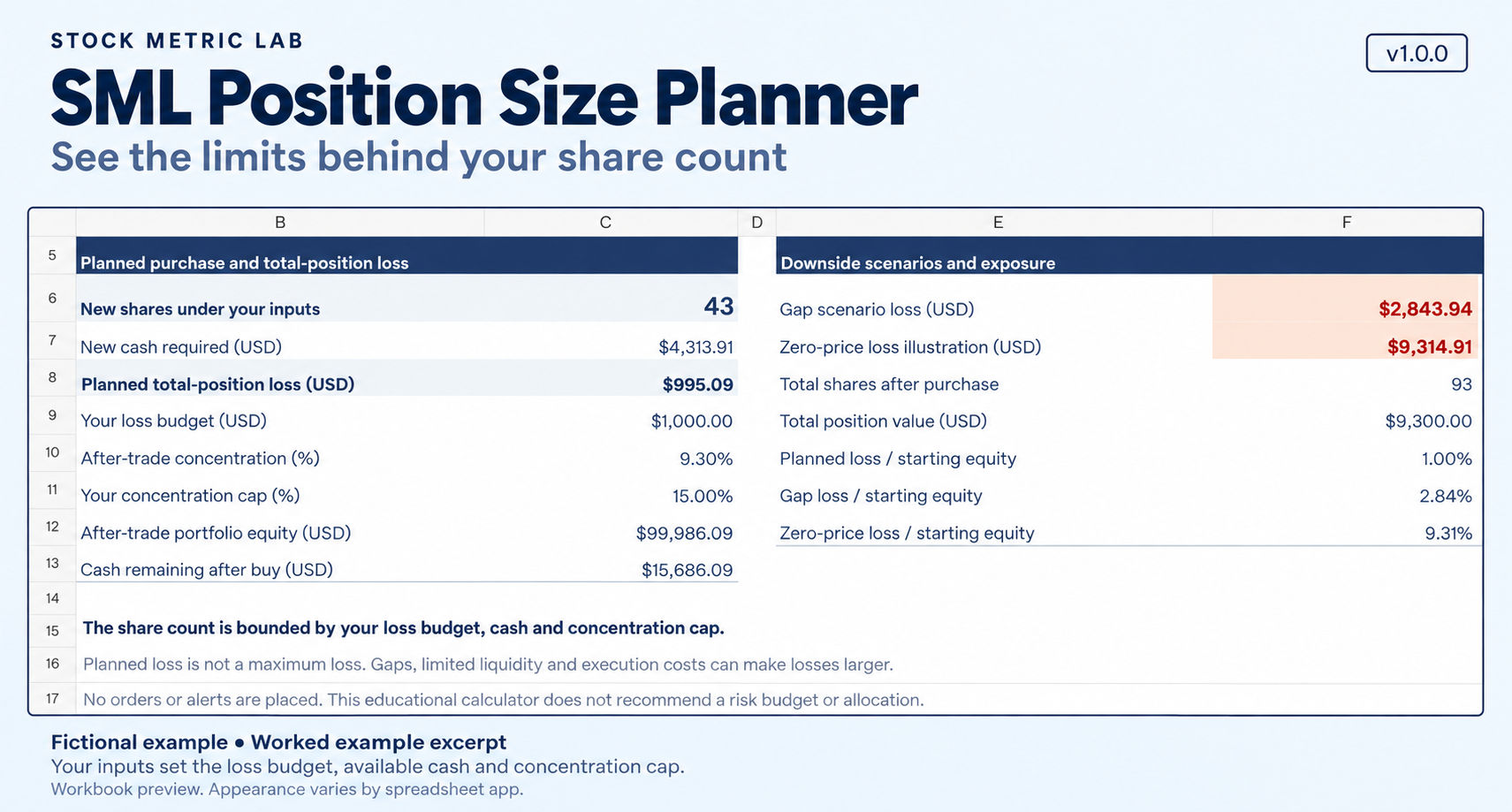
Open planner-results preview at full size
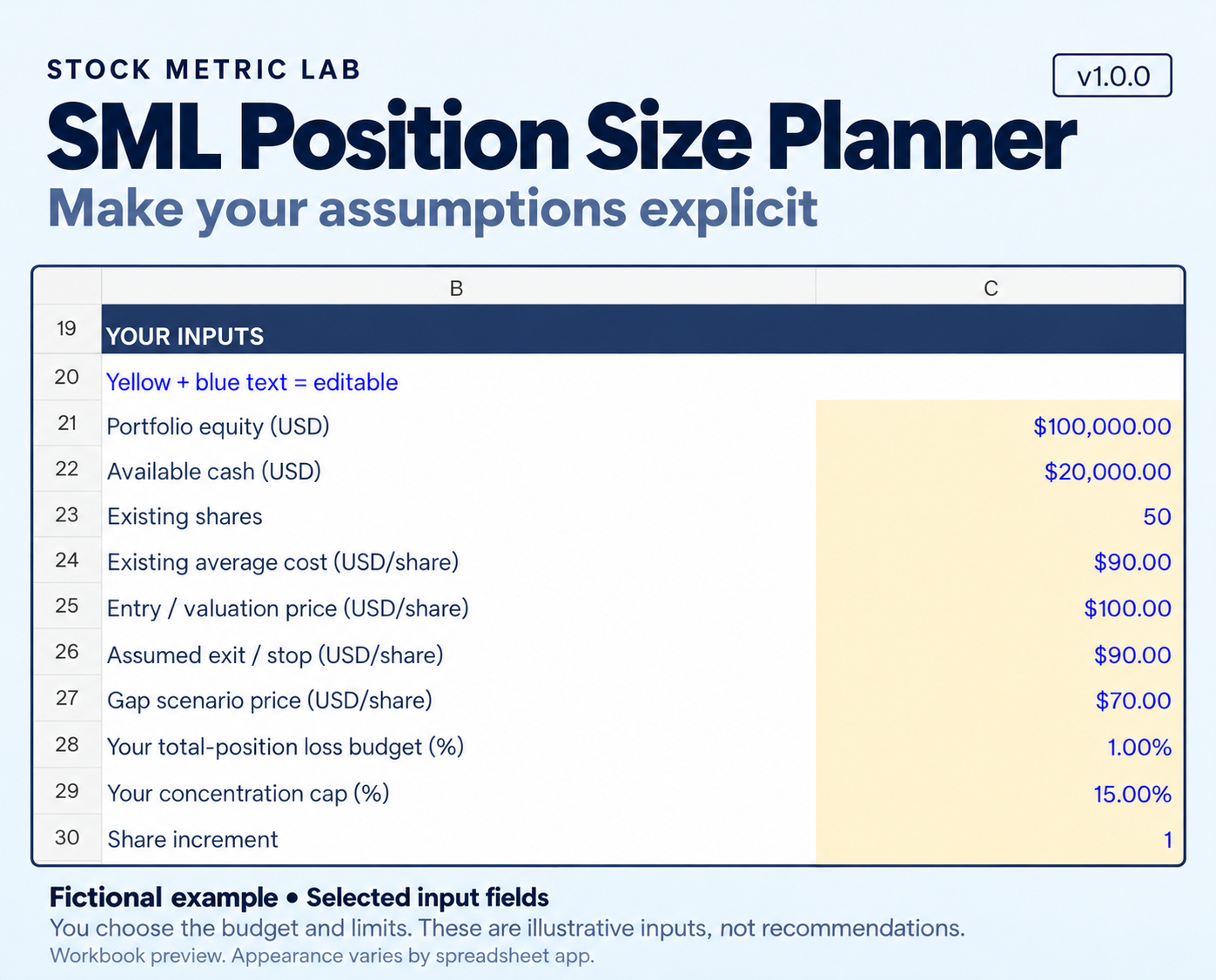
Open planner-inputs preview at full size
What is included
- One editable .xlsx workbook with Planner, Worked example and How to use sheets
- A blank planner with no preset numeric choices
- A fictional completed example to show the calculations
- An English guide explaining the inputs, cost assumptions and model limits
The fictional example’s percentages and prices are illustrations, not suggested risk settings.
Want the DCF, earnings-review and position-planning workbooks together? The USD 20 Stock Research Workbook Bundle includes all three and the Investment Thesis Notebook at no additional charge. The three workbooks separately total USD 25 before applicable taxes. The files do not exchange data automatically.
How you use it
- Use a consistent snapshot for portfolio equity, cash and the existing position’s value.
- Enter your intended entry price, an assumed exit price below it and a lower gap-price scenario.
- Choose your own loss budget and concentration cap, then enter costs, slippage and the supported share increment.
- Review the calculated new shares, cash needed, after-entry concentration and scenario losses. Check any warnings before using a result.
Planned loss is not maximum loss
An assumed exit price does not guarantee execution there. Prices can gap, trading can halt and liquidity can disappear. Actual losses can exceed the planned loss. The gap and zero-price illustrations are scenario calculations, not loss guarantees.
The workbook creates no stop order or other trade. A zero new-share result does not fix an existing holding that already exceeds your chosen limits, and this version does not calculate a sale.
The free ATR% guide explains why recent trading range cannot set a maximum loss or determine a suitable position size.
What this version covers
The planner is for USD, long-only stocks bought with cash. It assumes one purchase and one complete-position exit. It includes existing and new shares in the loss-budget and concentration checks; entry costs reduce the equity used for after-entry concentration.
It does not model leverage, short positions, options, FX conversion, taxes, dividends, fee tiers or minimums, multiple-order or partial-fill charges, or portfolio-wide correlations. Check your broker’s actual costs, share increments and minimum orders yourself.
Cash availability, other holdings and open orders are not independently checked. There are no live prices, broker links, alerts or automated trades.
Software and file handling
The v1.0.0 workbook uses labeled, colored input cells. Inputs and formulas are editable and unprotected, so keep an unchanged backup and avoid replacing formulas. No macros are included.
The calculation models in Earnings Check and Position Size Planner were tested in Windows Microsoft 365 Excel 16.0.20430.20146 and Windows LibreOffice Calc 7.4.2.3. A 14-case suite passed in each application, including recalculation and save/reopen checks. Version 1.0.0 preserves those formulas and calculation results. The publisher also confirmed use in Excel and Calc.
These checks cover the tested applications and cases. Excel for Mac, Excel for the web, Google Sheets, mobile apps and other versions have not been verified for this release.
Educational planning only
The calculated size depends on your inputs. It does not identify a safe allocation, choose suitable limits for you, recommend a stock or guarantee investment returns. You make the final decision.
Use, refunds and support
This is a one-time digital-download purchase. Applicable taxes are added, and the total is shown before payment. No physical product is shipped.
For the purchaser’s own learning and investment analysis. Personal backup copies are allowed. Sharing, redistribution and resale are prohibited.
A full refund of the purchase price is available on request within 14 days of purchase, for any reason, including after downloading.
You can also use the refund / withdrawal request form.
Basic-operation email support is available at research@stockmetriclab.com for 30 days from purchase. Replies may take several business days. Support does not include researching or valuing individual companies for you or personalized investment advice.
For refund or support requests, email with your order reference and a description of your request. Statutory rights relating to defects or non-delivery are not limited by the 14-day refund period or the 30-day support period.