
Bollinger Bands place a moving average and two adjustable volatility bands around price. They help you see whether a stock is trading near the high or low end of its recent price distribution, and whether that distribution is widening or narrowing. They do not tell you what the business is worth. John Bollinger describes their purpose as defining prices as relatively high or low in his official explanation.
Affiliate disclosure: This guide contains TradingView affiliate links. If you subscribe through one, Stock Metric Lab may earn a commission.
New to the platform? Start with our TradingView beginner guide. If moving averages are unfamiliar, read SMA versus EMA before adding the bands.
What the three Bollinger Bands mean
The traditional setup uses a 20-period simple moving average and places the outer bands two standard deviations above and below it. Standard deviation measures how spread out the selected prices are around their average. John Bollinger’s description of the calculation uses the same observations for the average and the standard deviation.
- Middle band: the 20-period SMA.
- Upper band: the middle band plus two standard deviations.
- Lower band: the middle band minus two standard deviations.
With Close selected, those observations are closing prices. An SMA gives each observation equal weight, as TradingView explains in its SMA documentation. All three bands use the chart’s price units. On a USD stock chart, a band reading is a price in dollars per share, rather than a score from 0 to 100.
Length counts bars. With the calculation timeframe set to Chart, length 20 uses 20 daily bars on a daily chart, 20 weekly bars on a weekly chart, or 20 hourly bars on an hourly chart. Twenty daily stock bars usually mean trading sessions, not 20 calendar days. TradingView supports a separate indicator timeframe, so check that setting too.
How to add Bollinger Bands in TradingView
- Open a stock in Supercharts. For the practice exercise below, use Microsoft, NASDAQ:MSFT, with standard candlesticks and the 1D chart interval.
- Select Indicators in the top toolbar, search for Bollinger Bands, and choose the built-in indicator from Technicals. A community script with a similar title may behave differently.
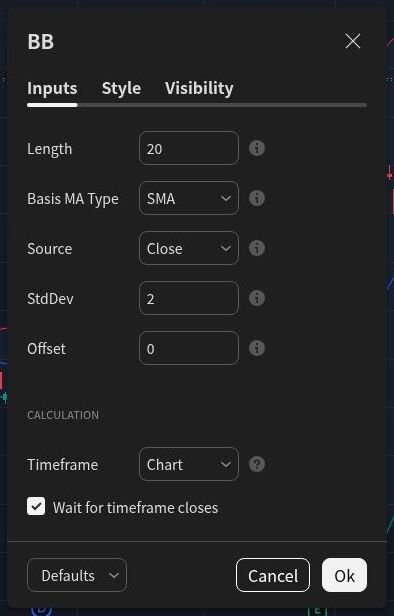
- Hover over the indicator’s name and select Settings to open its inputs. Set Length to 20, Basis MA Type to SMA, Source to Close, StdDev to 2, and Offset to 0.
- Set the indicator calculation Timeframe to Chart for this exercise. In Style, keep the basis, upper and lower lines visible, using colors you can distinguish.
TradingView’s indicator guide explains the menu route. Its Bollinger Bands help page lists these inputs; 20, Close, 2 and 0 are documented defaults. The SMA and Chart selections above deliberately keep this lesson on a traditional, same-timeframe setup.
The illustrated desktop chart, built-in indicator selection and input settings were checked in English on October 12, 2026. Menu placement can vary between devices.
How to read band touches and changing width
A band touch needs context
Price near the upper band is relatively high within this rolling calculation; near the lower band it is relatively low. Neither observation establishes that the stock is overvalued or undervalued. A band touch alone is insufficient to decide whether to buy or sell, as John Bollinger emphasizes in his rules for using the bands.
In a strong trend, price can repeatedly reach the same outer band, called walking the band. A rising market can stay near the upper band; a falling market can stay near the lower band. Check the trend before assuming a reversal. TradingView illustrates both cases in its walking-the-bands explanation.
A squeeze shows contraction, without choosing a direction
A squeeze is a period when the bands become narrow relative to their recent history. It highlights reduced price dispersion. A later expansion may accompany a stronger move. The practical inference from its possible upward and downward outcomes is that narrowing alone does not establish direction or timing.
Compare the same stock on the same timeframe. A width that looks unusually small on one chart may be ordinary on another. If you want a numerical measure, Bollinger BandWidth expresses the upper-to-lower distance relative to the middle band. TradingView’s BandWidth guide also warns that an apparent breakout after a squeeze can quickly pull back.
Wider bands describe the selected history
Expansion means the prices in the calculation are becoming more dispersed. It does not say whether an investment is attractive. Before drawing a conclusion, ask what changed in the price series and whether an earnings release, market move or other event needs separate investigation.
A simple Microsoft chart-reading exercise
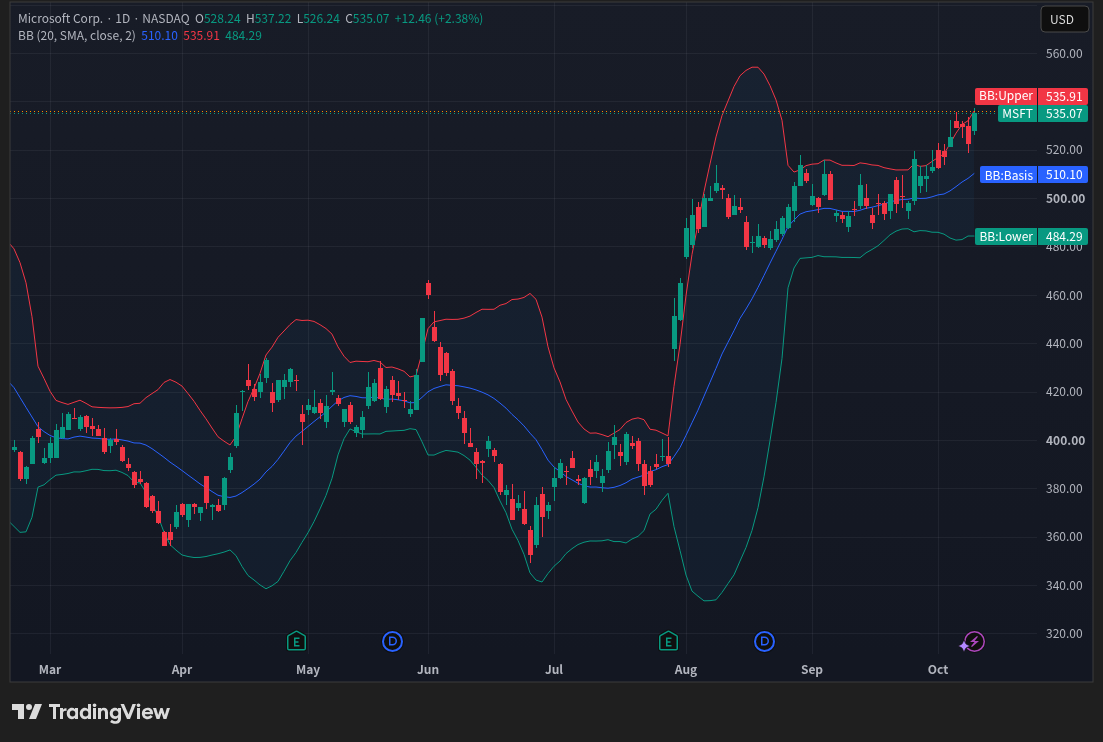
Use Microsoft as a familiar company for practicing the interface, rather than as a recommendation. Keep the 20/SMA/Close/2 setup above and display roughly six months of daily history.
- Choose a completed daily candle. Note its date and whether its close sits above, near or below the middle band. Look at the close, rather than confusing a temporary wick touch with a closing observation.
- Compare band width at that point with earlier parts of the same chart. Write down what you actually see. If there is no clear contraction, do not label one a squeeze.
- Inspect several neighboring candles. Does price approach the same outer band repeatedly, or move across the middle line? Describe the sequence before attaching a trading label.
- Switch to 1W while keeping length 20 and the indicator timeframe at Chart. You are now examining 20 weekly observations. Compare the questions answered by the two charts, rather than expecting identical lines.
A useful practice note is: “On [date], the completed daily close was [position], and the bands were [wider/narrower/similar] compared with [earlier date].” Fill the brackets from your chart. The note records an observation at a chosen time; it does not establish a trading rule or expected outcome.
Why the current bands can change
On an open candle, Close means the latest available price, not a completed closing price. A close-based moving average and standard deviation can therefore change as new updates arrive. TradingView’s execution model explains the distinction between historical bars and a developing realtime bar. Use completed candles when comparing observations.
If the indicator uses a higher timeframe than the chart, check Wait for timeframe closes. TradingView documents that, when enabled, this setting delays higher-timeframe values until that timeframe completes. It does not make every indicator configuration immune to changing values.
Do not assume a chart will always reproduce every historical reading unchanged. Data-feed revisions, adjustments and timeframe choices can affect the price history or calculation. TradingView discusses these limits in its repainting documentation. Record your symbol, feed, interval and settings when saving an example.
Use trend and RSI to ask another question
Start with price structure and the direction of the middle average. A rising average describes recent trend context; it remains a lagging calculation. Our moving-average guide explains that limitation.
RSI adds a momentum view. It measures recent upward and downward price changes on a 0–100 scale, while Bollinger Bands show relative price position and dispersion. TradingView’s RSI documentation explains the distinction. An upper-band touch alongside high RSI can occur in a sustained advance; the combination still does not guarantee a reversal. Read our RSI 70/30 guide before treating a threshold as a decision.
For a different volatility measure, ATR includes the high-to-low range and gaps relative to the previous close. It does not determine direction either. See TradingView’s ATR definition and our ATR percent guide. Additional indicators can help organize observations, but cannot remove every false signal or replace business research and risk planning.
Frequently asked questions
Do two standard deviations guarantee that 95% of prices stay inside?
No. A familiar normal-distribution rule does not give that guarantee for market prices or future observations. John Bollinger expressly warns against those statistical assumptions in his Bollinger Band rules.
Are 20 and 2 the best settings?
They are conventional defaults and a consistent starting point for learning. They are not an optimized strategy for every stock or timeframe. Change one setting at a time and distinguish understanding its effect from evidence of profitability.
Should I buy when price reaches the lower band?
A lower-band touch supplies one observation. Review the trend, the reason for the move and the investment’s risks before deciding what to do.
Your next step
Practice with a simple chart first. You can open TradingView here (affiliate link) and start with its free plan. Consider a paid plan only if you identify a feature you need, and check the current plan comparison before subscribing. Stock Metric Lab may earn a commission through the affiliate link.
Continue with RSI and momentum, or choose another task from the TradingView guides hub.
This article is for education, not personalized investment advice. Indicators cannot guarantee returns, and investing involves risk of loss.