
Affiliate disclosure: I use TradingView Premium. This article includes TradingView affiliate links; I may earn a commission if you purchase through them. A paid plan is not necessary to learn RSI.
The Relative Strength Index, or RSI, helps you examine price momentum. Its 0–100 scale is straightforward, but labels such as “overbought” can encourage rushed conclusions. This guide explains the numbers, the 14-period setting, and a simple TradingView setup for beginners.
Before adding RSI, review candlesticks, chart axes, and volume so you can distinguish the price chart from the oscillator below it.
What RSI measures
RSI compares the size of recent upward and downward price changes using smoothed averages. RSI is a bounded momentum oscillator: its values range from 0 to 100. Higher readings reflect stronger recent gains relative to losses; lower readings reflect the reverse. See Schwab’s RSI description.
For a different momentum measure, compare RSI with MACD and its histogram. MACD uses price-difference units and has no fixed 0–100 range, so RSI’s 70/30 levels do not apply to it.
The comparison is between one asset’s gains and losses. Comparing a stock with a benchmark such as the S&P 500 is a separate relative-performance analysis.
RSI does not measure a company’s earnings, debt, or fair value. A reading of 75 is neither a 75% return nor a 75% probability that the next price move will be upward.
How to read 70 and 30
The conventional labels are overbought above 70 and oversold below 30. Strong trends can keep RSI in either region for extended periods, as Fidelity’s indicator guide explains. Neither threshold sets a deadline for a reversal.
Consider three hypothetical readings, used only to practice reading the scale:
- RSI 72: above the usual upper threshold. Ask whether price is still making higher highs before assuming the advance has ended.
- RSI 48: close to the midpoint. This reading alone says little about whether a business is attractively valued.
- RSI 27: below the usual lower threshold. Investigate why the price has fallen; it may continue falling.
In an uptrend, repeatedly selling only because RSI exceeds 70 can cut short an ongoing advance. In a downtrend, repeatedly buying below 30 can add exposure while losses deepen. Read the price trend alongside the oscillator.
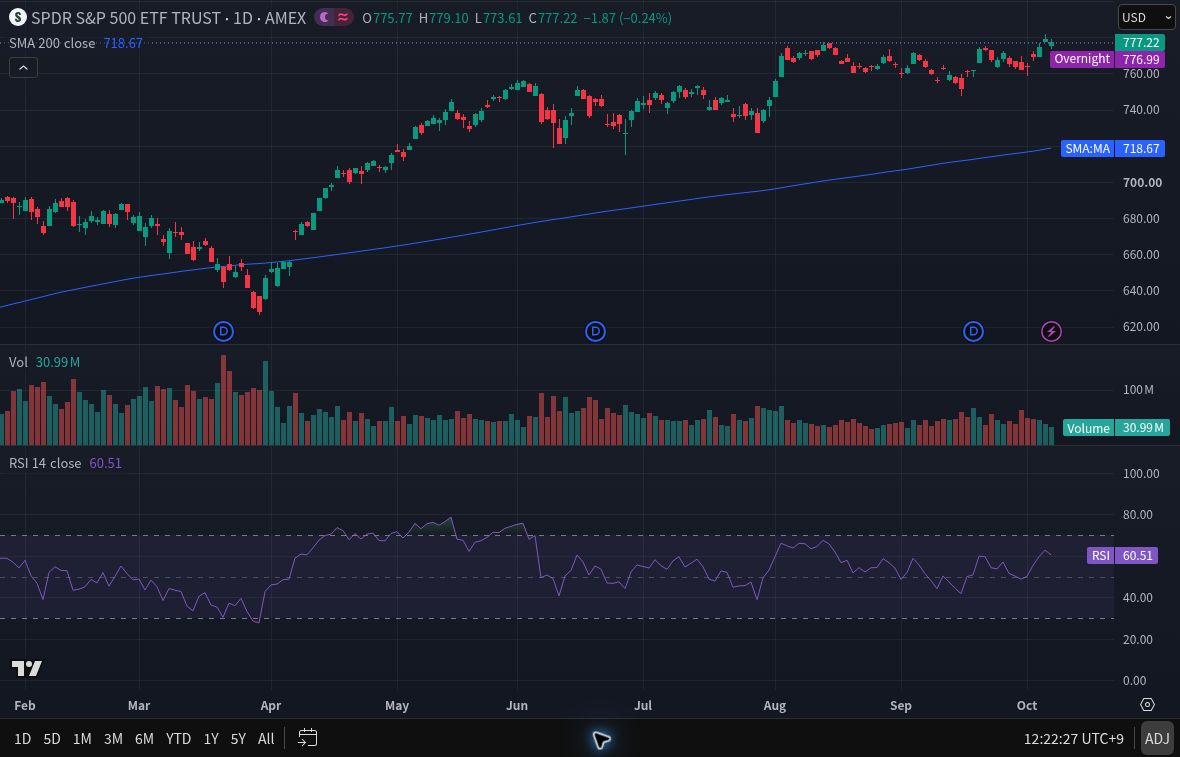
In the bottom panel, RSI 60.51 is above 50 and below 70. Read it against the 0–100 scale, separately from the USD price scale. Dashed guides mark 30, 50, and 70; the numbered axis ticks use 20-point intervals. This three-indicator layout can be simplified for Basic as explained below.
The RSI formula in plain English
TradingView’s RSI documentation gives this relationship:
RSI = 100 − 100 ÷ (1 + RS)
RS = smoothed average gain ÷ smoothed average loss
Losses enter the denominator as positive magnitudes. TradingView’s example uses RMA for both averages. This is Wilder-style smoothing, with a weight of 1 divided by the length for the newest observation, rather than a fresh simple average at every bar. TradingView documents that weight in its RMA reference.
In a hypothetical calculation, a smoothed average gain of 2 and average loss of 1 produce RS = 2 and RSI ≈ 66.7. Equal nonzero averages produce RSI = 50. These examples explain the scale; they do not forecast a return.
Does RSI 14 mean fourteen days
TradingView’s default RSI Length is 14 bars, and its default Source is Close. With the indicator following the chart timeframe:
- A daily chart uses daily bars, so exchange holidays and weekends can make 14 stock-market bars span more than 14 calendar days.
- A weekly chart uses weekly bars.
- A one-hour chart uses hourly bars.
The length controls smoothing; older observations still influence the running averages. Also check the indicator’s Calculation → Timeframe setting: TradingView permits an indicator timeframe different from the chart’s. A daily RSI and a weekly RSI answer different questions about momentum.
How to add RSI on TradingView
- Open a stock in Supercharts and choose a daily or weekly chart for this exercise.
- Click Indicators on the upper toolbar. Search for Relative Strength Index and choose TradingView’s built-in indicator under Technicals.
- Double-click the indicator’s name to open its settings. In Inputs, check RSI Length: 14 and Source: Close.
- Keep the calculation timeframe matched to your chart while learning. Leave Calculate Divergence off for this basic exercise.
- For a simpler display, choose None under Smoothing → Type. Read the RSI line against the 70, 50, and 30 reference levels.
These controls are described in TradingView’s indicator guide and settings instructions. The Smoothing option adds a separate moving-average line to RSI. Selecting None removes that extra line; it does not remove the smoothing inside RSI’s calculation.
Using Basic: TradingView’s plan comparison, checked October 10, 2026, lists two indicators per chart. If you already have an SMA and Volume, remove one, such as Volume, before adding RSI. You can swap it back afterward. You do not need all three simultaneously for this lesson.
Why RSI changes before a candle closes
The newest candle may still be forming. As its latest price changes, RSI can move above or below a threshold and then return before the candle closes. TradingView’s execution documentation explains these updates.
For example, a hypothetical daily RSI might reach 71 during the session and finish at 68. A brief crossing and a closing reading are different observations. When keeping a learning journal, record whether the bar is complete. On a weekly chart, a midweek reading is still provisional.
For an optional notification exercise, the illustrated TradingView alerts guide shows an RSI condition with Once per bar close and explains the separate technical-alert allowance.
How long-term investors can use RSI
Use RSI to describe the price behavior surrounding your research. If a stock’s RSI is low, ask whether recent results changed its cash-flow outlook, balance-sheet risk, or valuation assumptions. A low reading cannot resolve those questions.
Pair the chart with our fundamental stock-analysis framework. Fidelity likewise advises combining RSI with fundamental and other analysis.
For practice, record the symbol, timeframe, RSI settings, last closed-bar reading, and price trend. Write one sentence about what RSI shows and one question it leaves unanswered. Repeat without treating the exercise as a trading recommendation.
To place RSI in a simple routine, return to the weekly chart review guide.
Frequently asked questions
Should I buy when RSI falls below 30
A reading below 30 alone is insufficient. It flags recent downward momentum; the price can keep falling. Review the business, trend, and risks before making an investment decision.
What are the best RSI settings for beginners
TradingView’s 14-bar, Close-source defaults are a practical learning baseline. No setting works best across every asset and timeframe. Keep settings consistent while learning what the readings mean.
Does RSI divergence guarantee a reversal
No. Price and RSI moving differently can prompt closer inspection, but a trend may continue. Divergence is an observation to investigate, not a guaranteed turning point.