
A simple weekly review workflow
New to stock charts? Start with how to read one candle, the axes, and volume. Then return here when those basics feel familiar.
A long-term investor can use charts to notice changes worth investigating, organize a watchlist, and decide when to revisit a valuation. This guide offers a small weekly routine built around business fundamentals and a few TradingView features. You do not need intraday charts or a paid subscription to begin.
Technical analysis studies price and trading-volume history to describe trends, momentum, and market activity. In this guide, those observations help long-term investors decide what to investigate next. They do not establish a company’s fair value or predict returns.
A moving average cannot establish intrinsic value. Keep valuation assumptions and business evidence visible throughout the review.
Begin with the free Basic plan and two indicators: SMA200 and Volume. The optional RSI example later in this guide shows an expanded setup; RSI is not required for the weekly routine.
Disclosure: I use TradingView Premium and may earn a commission if you purchase a subscription through links in this article.
1 Start with the business and a valuation range
Choose a few companies you already understand. For each, write down the investment thesis, the main risk, the next reporting event, and the evidence that would change your view. A price decline deserves a different response when the business has deteriorated than when your assumptions remain supported.
Use the Stock Metric Lab DCF Calculator to explore an assumption-driven valuation range. Run conservative, base, and optimistic cases by changing justified inputs, then record why they differ. These scenarios are conditional estimates, not forecasts of where the share price will trade or when it will get there.
Keep the assumptions in a separate note. Revise them when business evidence changes, rather than merely to agree with the chart.
2 Build a small watchlist and check the data
In Supercharts, open Watchlist on the right toolbar, click the plus button, search for a stock, and add the intended listing. Check the exchange and currency, especially when several securities have similar names. Start with three to five companies so that each receives a meaningful review. TradingView’s watchlist guide explains these controls.
Before interpreting a chart, check the data source and any delay indicator. TradingView says its default US stock charts use real-time Cboe data, which can differ from primary-exchange feeds. Prices, updates, and reported volume may therefore differ from another platform. Other markets may have delayed quotes. See TradingView’s US data explanation and data coverage.
Also record the chart’s adjustment setting. Dividend adjustment changes historical prices and can change indicator readings. Where available, use “Adjust data for dividends” in chart settings when exploring the effect of distributions. Keep the setting consistent across reviews, and do not treat adjusted historical levels as prices at which you necessarily could have traded. TradingView documents dividend adjustments here.
3 Use the weekly chart for perspective
Select the one-week interval in the top toolbar and view several years where history is available. With candlesticks, each candle summarizes that week’s open, high, low, and close. Focus on broad direction and the size of past declines. A weekly view reduces visual clutter, although it can hide substantial movement within each week.
Ask one question: Has the recent move created a research question? For example, a sharp decline around earnings might justify reading the release and guidance. The candle itself cannot explain the cause. Review after the market’s final session of the week when possible, since an unfinished weekly candle can still change. The Supercharts guide describes interval and chart-type controls.
4 Check the daily chart with one moving average
Switch to the one-day interval. Open “Indicators, metrics, and strategies,” find the built-in Simple Moving Average, and open its settings. Set Length to 200, Source to Close, and Offset to 0. Use the chart’s daily timeframe for its calculation. On this setup, the average reflects 200 daily bars, approximately 200 trading sessions.
A 200-period average calculated on weekly bars instead describes 200 weeks. To avoid confusion, use the weekly chart for perspective and read this indicator on the daily chart.
Note whether price is above or below the average and whether the average is rising, flat, or falling. It summarizes past prices and reacts slowly. Repeated crossings in a sideways market can produce whipsaws; waiting for a recovery above it can also miss gains. Use the observation to organize questions, without treating a crossing as an automatic instruction. TradingView’s SMA documentation explains its lagging nature and inputs.
For the calculation, weighting differences, and daily-versus-weekly settings, read SMA vs. EMA explained.
5 Read volume in context
Add the standard Volume indicator if it is not already visible. Compare a completed daily bar with other recent completed daily bars on the same feed. A partial session or shortened holiday session is not directly comparable with a full trading day.
Unusually high volume may make a move worth investigating, but it does not identify investors’ motives or prove informed buying. Earnings, index changes, and other events can affect activity. Check the underlying news and remember that the displayed volume depends on the feed. Avoid comparing Cboe volume with a different source as though their coverage were identical.
6 Set a reminder to review the valuation
Pick a price at which you would want to revisit the company’s valuation and thesis. Click Create alert in the upper toolbar. Select Price as the condition, choose an operator such as Crossing, and enter the level. Check the expiration, notification method, and message before creating it. A useful message is “Review the latest filing and valuation assumptions.” See TradingView’s price-alert instructions and alert overview.
A plain price alert differs from an alert attached to a moving-average indicator or a whole watchlist. This routine uses individual price alerts. Check the current Basic plan allowance and alert duration before setup, and review expiration dates regularly. Reserve alerts for your highest-priority questions and review the remaining names manually.
An alert is a notification, not an order or a guarantee of a particular execution price. Confirm the quote, data timing, and current company information before making any decision.
7 Return to the assumptions
When a stock moves substantially, the Stock Metric Lab Reverse DCF Calculator offers a complementary question: What constant annual growth in free cash flow to the firm would reconcile this share price with the model’s other assumptions?
The result depends on starting FCFF, WACC, terminal growth, cash, debt, and diluted shares. It does not directly solve for revenue growth or operating margins. Judge the implied FCFF growth against your separate business analysis. A favorable-looking chart cannot prove that a stock is undervalued, and an attractive model output can reflect unrealistic inputs.
An illustrative weekly review
After the initial setup and fundamental research, a small watchlist might fit the following 10–15 minute outline. This is an illustrative time budget, not a tested performance claim. Earnings or a changed thesis will often require much longer.
- Minutes 1–3: Check material company news and upcoming reports. Flag anything that needs deeper reading.
- Minutes 4–8: Review weekly direction, then daily price, the 200-day average, and volume.
- Minutes 9–12: Compare prices with your valuation ranges. Refresh only assumptions supported by new evidence.
- Minutes 13–15: Review alert levels and expiration dates. Write the next research action, or record that no further work is needed this week.
Start with one company, one valuation note, and one price alert. Document why an assumption needs further investigation or revision.
Educational information only. This workflow is not individualized investment advice or a recommendation to buy or sell a security. Investing involves risk, including loss of capital.
Reading the optional expanded chart
I use TradingView Premium. The historical example below adds RSI to SMA200 and Volume. Start on the free Basic plan with SMA200 and Volume, which use its two-indicator allowance. RSI is optional: replace one of those indicators if you want to try RSI while staying within that limit, or check the current plan comparison for additional indicator capacity. Premium is not required to begin.
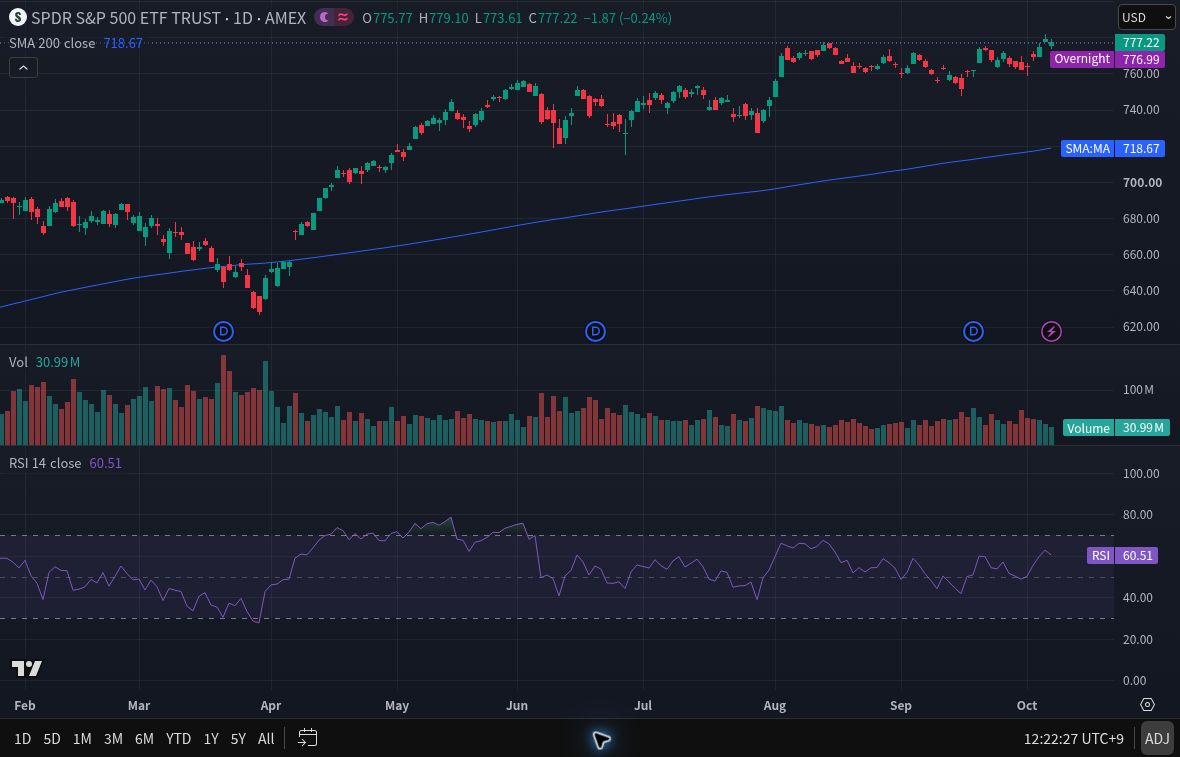
- Top panel: The right axis is USD per SPY ETF share. The blue SMA200 line averages 200 daily closes on this adjusted series. Its label uses the same dollar scale as price.
- Middle panel: Volume counts ETF shares or units reported by the feed, not dollars. “M” means million, so 30.99M means approximately 30.99 million units. This feed need not represent total market volume.
- Bottom panel: RSI14 uses closing-price changes with a 14-period setting. Its 0–100 scale is an oscillator score, not dollars or a probability. The 30 and 70 lines are conventional reference levels, not automatic buy or sell instructions. See TradingView’s RSI guide.
For the oscillator scale, 70/30 levels, and a simpler two-indicator setup, see RSI explained on TradingView.
The example uses Close as the source for SMA200 and RSI14, with no additional smoothing overlay. SPY illustrates chart reading; it is not a security recommendation or a substitute for company-level DCF analysis.
Learn the TradingView controls
If a platform setting interrupts your review, use the illustrated guide for that task:
- TradingView basics: set up your first chart covers symbol search, intervals, data checks, watchlists, and saved layouts.
- Set and check TradingView alerts explains price and indicator conditions, bar-close timing, notifications, and expiration.
Technical analysis basics: choose your next chart question
Start with one question and try it with a company you know. You can return to this page whenever you want to learn another idea. You do not need every study on one chart.
Start with the basics
- What am I looking at? Your first stock-chart lesson explains one candle, time and price axes, and volume with a hypothetical example.
- Which way is the trend? Moving averages: SMA and EMA explains what one line can show and how daily and weekly views differ.
- Is the stock keeping up with the market? Relative performance shows how to compare a stock with the market or sector over the same dates.
Explore price moves and momentum
- How large is the recent trading range relative to price? ATR percent converts a dollar range into a percentage and explains why it is not a loss limit.
- Is the price gaining or losing momentum? RSI and its 70/30 levels explains the indicator and why those levels alone are not buy or sell instructions.
- How do shorter- and longer-term averages relate? MACD lines and histogram guide explains signal-line and zero-line crossings, price-unit scales, and the limits of crossover signals. Try it as a separate learning exercise; Basic users may need to remove an existing indicator first.
Go deeper when you have a specific question
- What changed after earnings? Anchored VWAP after earnings explains how to choose an event anchor and read a volume-weighted reference without treating it as a price floor.
- Where was trading activity concentrated in a chosen window? Fixed Range Volume Profile explains POC, value area, and how changing the row count changes the picture.
I may earn a commission if you purchase a subscription through the following link. Check the exact current features and plan limits for your needs before subscribing.