
Is your stock beating the market
A rising stock can still trail the market. A falling stock can outperform a benchmark that falls further. Long-term investors need both observations: the stock's own change and its performance against a relevant alternative.
Relative performance adds that second perspective. Used alongside business analysis, it can identify a question worth investigating. It cannot establish fair value, explain a price move, or prove that recent leadership will persist.
If the chart itself is unfamiliar, start with candlesticks, time and price axes, and volume before comparing two investments.
Start with one daily price chart, SMA200, and Volume on free Basic, as shown in the weekly chart review guide. Then try the built-in Compare tool. Check the current plan comparison for the limits relevant to your setup before choosing a subscription. Compare overlays and custom spread formulas have different feature requirements; check the exact tool you intend to use.
Disclosure: I use TradingView Premium and may earn a commission if you purchase a subscription through links in this article.
Choose a benchmark that answers your question
For Microsoft, SPY offers a broad US large-cap reference. SPY seeks to track the S&P 500, so it helps frame the opportunity cost of researching an individual company instead of using that broad exposure. It does not represent every global investment opportunity.
A second comparison with XLK adds technology-sector context. XLK represents the technology sector of the S&P 500 and includes Microsoft. Its large holdings and sector concentration affect the result, and its mix of businesses is not a perfect match for Microsoft's software and cloud operations.
For the difference between a company stock and the funds used as benchmarks here, read stocks, mutual funds, and ETFs explained.
Beating SPY while trailing XLK would raise a different research question from trailing both. Choose the benchmarks before reviewing the result. Replacing a difficult benchmark with an easier one can turn a review into an exercise in defending a position.
Understand the three different tools
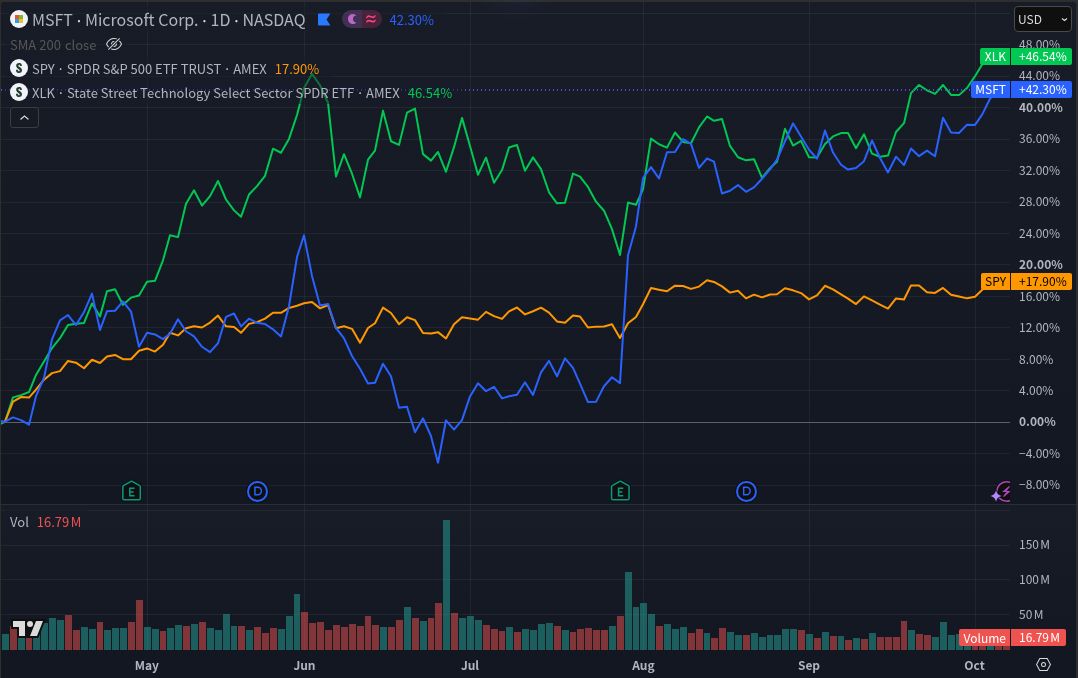
A percentage comparison rebases each series to a common starting point and displays its subsequent percentage change. TradingView's Compare documentation ties that baseline to the visible chart period. Zooming or scrolling can therefore change the displayed performance comparison. Record the dates rather than relying on a remembered screenshot.
A price ratio divides the stock price by the benchmark price. With consistent observations and adjustments, a rising ratio means the stock is gaining relative to the benchmark; a falling ratio means it is losing ground. TradingView supports division through spread formulas. The raw ratio level depends on each security's share price and is not a valuation multiple. A percentage-point gap between two rebased lines is also different from the percentage change in their price ratio. Custom formula availability has separate plan limits.
The Relative Strength Index, or RSI, measures a security's own recent upward and downward price changes on a bounded scale. It does not compare that security with SPY. Similar names do not make these tools interchangeable.
Build two views in TradingView
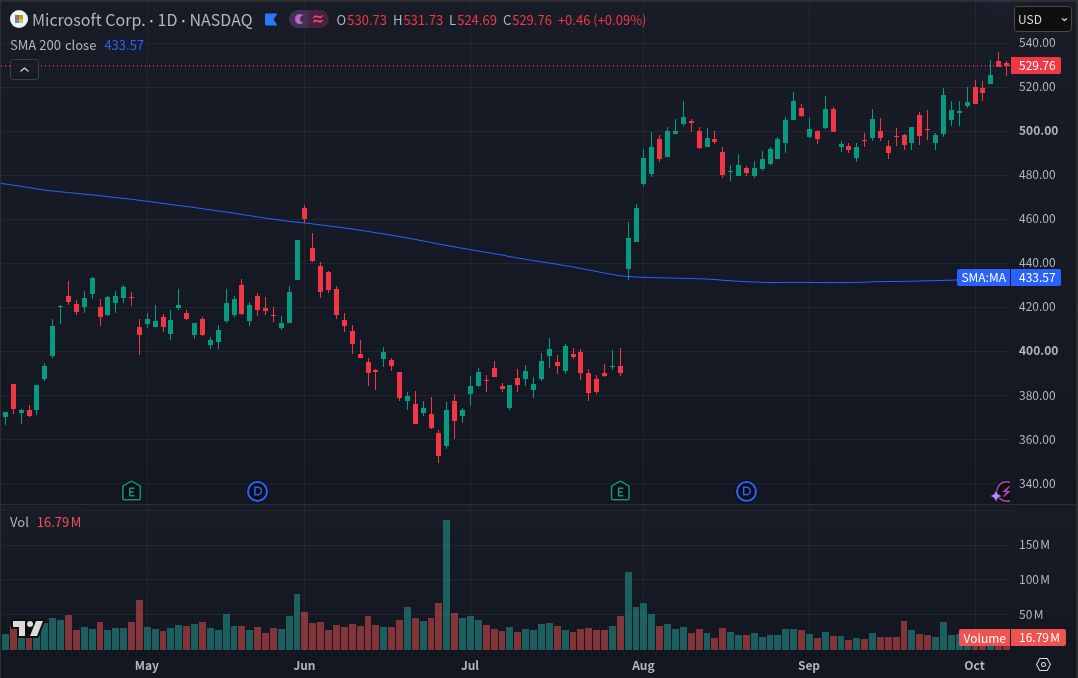
Start with MSFT on a daily chart. Add the built-in Simple Moving Average with Length 200, Source Close, and Offset 0, calculated on the chart timeframe. Add Volume. The 200-period SMA then summarizes 200 daily bars; switching its calculation to weekly bars changes its meaning.
Read the price, the average's direction, and activity around completed sessions. An average reacts to past data and can lag a reversal. Volume can flag unusual activity without identifying who traded or why. This view preserves the absolute-price context that a relative comparison alone can hide.
For the comparison view, open Compare or Add symbol on the top toolbar. Add the intended SPY and XLK listings to the same percentage scale. Keep the daily interval, verify the symbols, and choose a fixed visible date range. Hide the indicators if they obscure the comparison; retain the separate price view for context. TradingView's Compare guide shows the control.
Make the comparison reproducible
- Dates and sessions: Use the same start and end dates for every series, regular trading sessions, and completed daily bars. Check missing observations and avoid comparing an unfinished session with a completed one.
- Currency and scale: Keep these US listings in USD. Record whether the price chart is linear or logarithmic; equal vertical distances have different meanings. Use the shared percentage scale for Compare and keep the visible baseline fixed. Neither display automatically measures your home-currency return.
- Adjustments: Check split and dividend conventions for every series. A consistent price-only comparison excludes distributions. Dividend adjustment incorporates their effect into historical data. Do not mix a dividend-adjusted stock with an unadjusted benchmark or assume one setting controls all overlays. If you cannot verify matching conventions, do not describe the chart as a total-return comparison.
- Data and costs: Record each listing, feed, and delay status. TradingView explains that default US stock data can differ from primary-exchange feeds. These charts do not calculate your personal fees, taxes, or trading costs. ETF expenses affect fund performance, and an ETF's market-price series is not identical to its index.
Read the result without turning it into a trade rule
The matrix applies to a consistently measured period and one stated benchmark. It describes observed performance, without predicting the next move.
| Stock move | Relative result | Research question |
|---|---|---|
| Rises | Outperforms | Have cash-flow expectations improved enough to support the valuation? |
| Rises | Underperforms | Is the gain mainly broad-market or sector exposure? |
| Falls | Outperforms | What explains the relative resilience, and what absolute loss remains? |
| Falls | Underperforms | Has the business thesis weakened, or have expectations reset? |
Check whether the same question survives another preselected horizon, such as a shorter review period and a multiyear view. Do not slide the starting date until the answer looks favorable. Relative performance does not adjust for volatility, leverage, concentration, or the severity of interim drawdowns. This simple comparison also does not reproduce a professional momentum-factor strategy.
Bring the question back to the business
Investigate whether revenue quality, margins, reinvestment needs, dilution, or financing changed. Stock Metric Lab's NVIDIA, AMD, and Broadcom comparison illustrates why companies grouped around one investment theme can have different business economics. That distinction matters when selecting peers and explaining divergence.
Use the DCF Calculator to test an assumption-driven value range. Use the Reverse DCF Calculator to examine the constant annual FCFF growth implied by a dated price and your other assumptions. The latter does not directly solve for revenue growth or margins; connect its output to a separate operating analysis.
For your next review, choose one company and two relevant benchmarks. Save the dates and settings, write one sentence describing absolute and relative performance, and identify the filing or valuation assumption to examine next. If no new evidence changes the thesis, record that conclusion rather than manufacturing a trading signal.
Educational information only. This article is not individualized investment advice or a recommendation to buy or sell. Past performance does not assure future results, and investing involves the risk of loss.
I may earn a commission if you purchase a subscription through the following link. Check the exact current features and plan limits for your needs before subscribing.