
Learn what the two lines measure, why 80 and 20 are only reference levels, and how to check a crossover against the price chart.
A stochastic reading of 90 can appear beside a stock that keeps rising. A bullish crossover below 20 can appear just before another decline. Both are consistent with the way the indicator is calculated.
The Stochastic Oscillator describes where recent closing prices sit within a rolling high–low range. It does not measure a company’s value or the probability that its shares will rise. This guide explains the calculation, a practical TradingView setup, and two historical examples that make the limitations visible.
If candlesticks and chart intervals are unfamiliar, start with how to read a stock chart. The examples here are for learning, not recommendations to trade Microsoft or any other security.
The quick answer
- %K is the main oscillator line. In the TradingView setup used here, it is a three-bar average of a 14-bar range calculation.
- %D is a three-bar average of %K.
- 80 and 20 mark conventional high and low regions on a 0–100 scale. They are not automatic sell and buy instructions.
- 14 / 3 / 3 must be read by field name: a 14-bar lookback, three-bar %K smoothing, and three-bar %D averaging. Do not assume every platform orders its settings the same way.
This guide follows TradingView’s documented Stochastic calculation. The three settings are a reproducible starting point, not a claim that they are optimal.
Understand the calculation before interpreting a line
Begin with an unsmoothed value. Find the highest high and lowest low in the current bar and the preceding 13 bars. Then locate the current close inside that range:
Raw value = 100 × (Close − Lowest low) ÷ (Highest high − Lowest low)
This is the price-range idea described in Fidelity’s Fast Stochastic guide. A value near 100 places the close near the range’s upper end; a value near zero places it near the lower end.
A fictional example: suppose the 14-bar high is $110, the low is $90, and the latest close is $108. The raw value is 100 × (108 − 90) ÷ (110 − 90) = 90. It is not a 90% chance of a gain, a 90% return, or evidence that 90% of market participants are buyers.
Now apply the smoothing. If the latest three raw values are 70, 80, and 90, displayed %K is 80. If the latest three %K values are 60, 70, and 80, %D is 70. The current raw reading and the displayed %K are therefore different numbers.

The window moves on every bar. An old high or low can drop out, changing the denominator. Consequently, a change in the oscillator is not a simple restatement of that day’s price change. Compare the range and both lines, rather than translating every uptick into new buying pressure.
If the window’s high and low are equal, the raw formula divides by zero. Treat that as an undefined calculation, not as an ordinary reading of zero. Also allow enough preceding bars for both averages; this formula first has a complete %D after 18 observations.
Why fast and slow versions do not always match
Reducing %K smoothing from three to one removes that averaging step. The line then reacts directly to each raw reading. Additional smoothing changes the timing and shape of crossovers; it cannot add information about the future.
Labels such as “fast,” “slow,” and “full” are not sufficient to reproduce a chart. For example, Fidelity’s Slow Stochastic page expresses its smoothing as a ratio of summed price differences, whereas TradingView documents an average of the individual ratios. These need not be identical when the range changes. Match the formula as well as the three input numbers.
Set up the built-in Stochastic in TradingView
Open Supercharts with the intended stock and listing. Use ordinary daily candlesticks for this exercise. If you need help finding the controls, use our TradingView beginner guide.
- Open Indicators in the upper toolbar and search for Stochastic.
- Choose the built-in technical indicator, not Stochastic RSI, a community script, or a strategy with a similar name.
- Open the indicator’s settings and identify each input by its label. Use the values below.
- Keep the two lines visually distinct and leave the 80 and 20 reference lines visible.
TradingView’s indicator guide explains the menu and the distinction between built-in studies and community scripts.
| Input | Value | Purpose |
|---|---|---|
| %K length / K | 14 | Number of bars in the high–low window |
| %K smoothing / Smooth | 3 | Average of the raw readings |
| %D smoothing / D | 3 | Average of the displayed %K readings |
| Upper / lower reference lines | 80 / 20 | Conventional comparison levels |
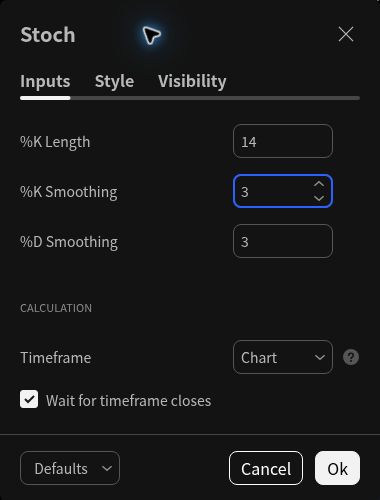
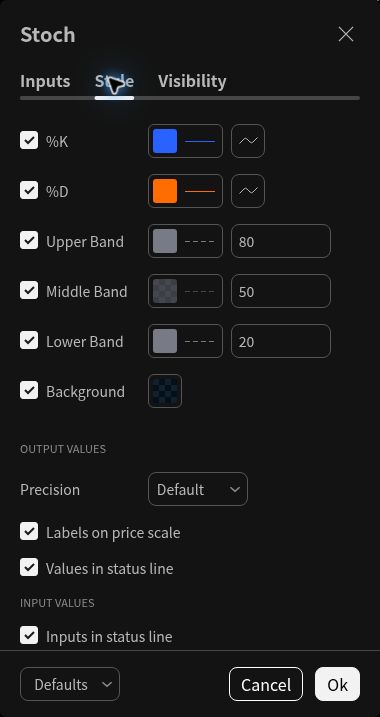
Record the listing, data feed, currency, interval, session, and dividend-adjustment setting. If a separate indicator timeframe is available, keep it the same as the chart for this exercise. TradingView documents chart settings and indicator timeframe controls separately.
Fourteen daily bars are 14 trading sessions, not 14 calendar days. Fourteen weekly bars describe a much longer period. Before comparing two readings, check that the bars and inputs really match. Use a completed candle when recording a historical observation; a live bar’s high, low, and latest price can still change.
Read levels and crossovers as observations
Above 80 and below 20
With this smoothed version, a high reading means recent raw range-position readings have averaged near the upper end of the 0–100 scale. A low reading describes the opposite. The usual labels are “overbought” and “oversold,” but neither label establishes cheapness, expensiveness, or an imminent reversal.
A stock making repeated higher highs can remain above 80. A falling stock can remain below 20. Schwab’s discussion of momentum extremes emphasizes the importance of the surrounding trend. Read price first: is it moving through higher highs and lows, declining, or repeatedly returning to a similar area?
A %K and %D crossover
An upward crossover occurs when %K moves from at or below %D to above it. A downward crossover reverses that relationship. It tells you that the faster line’s position relative to its own average has changed.
Do not confuse this with %K crossing 20 or 80. A %K/%D crossover can happen while both lines remain below 20, as the April 2022 example shows. Write down the exact event you mean instead of describing all three as “the stochastic signal.”
A sensible follow-up question is whether price has changed too. Has it recovered a previously marked zone, or is it still making lower lows? Our support and resistance guide explains how to mark those areas without treating them as guaranteed barriers.
Divergence
A higher price high paired with a lower oscillator high is commonly called bearish divergence; a lower price low paired with a higher oscillator low is bullish divergence. Fidelity describes these comparisons as potential momentum warnings.
The practical difficulty is selecting the turning points. In hindsight, it is easy to connect the two peaks that best tell the story. A pivot may also require later bars before you can identify it. Mark the dates and your comparison rule in advance; do not present a later-confirmed pivot as information already available on its own date.
Two historical examples with different lessons
The following examples use Microsoft daily charts before 2026, with TradingView’s built-in Stochastic set to 14 / 3 / 3. They were selected retrospectively to illustrate interpretation problems. They are not a representative sample, a trading-system test, or evidence of a win rate.
Example 1: A high reading persisted during an advance
On October 14, 2021, MSFT closed at $302.75. The chart displayed %K of 80.35 and %D of 72.40. The later chart shows %K spending an extended period above 80 during the advance; on November 19, %K was 87.70 and %D was 88.69. The November 19 close was $343.11, about 13.33% above the October 14 close.
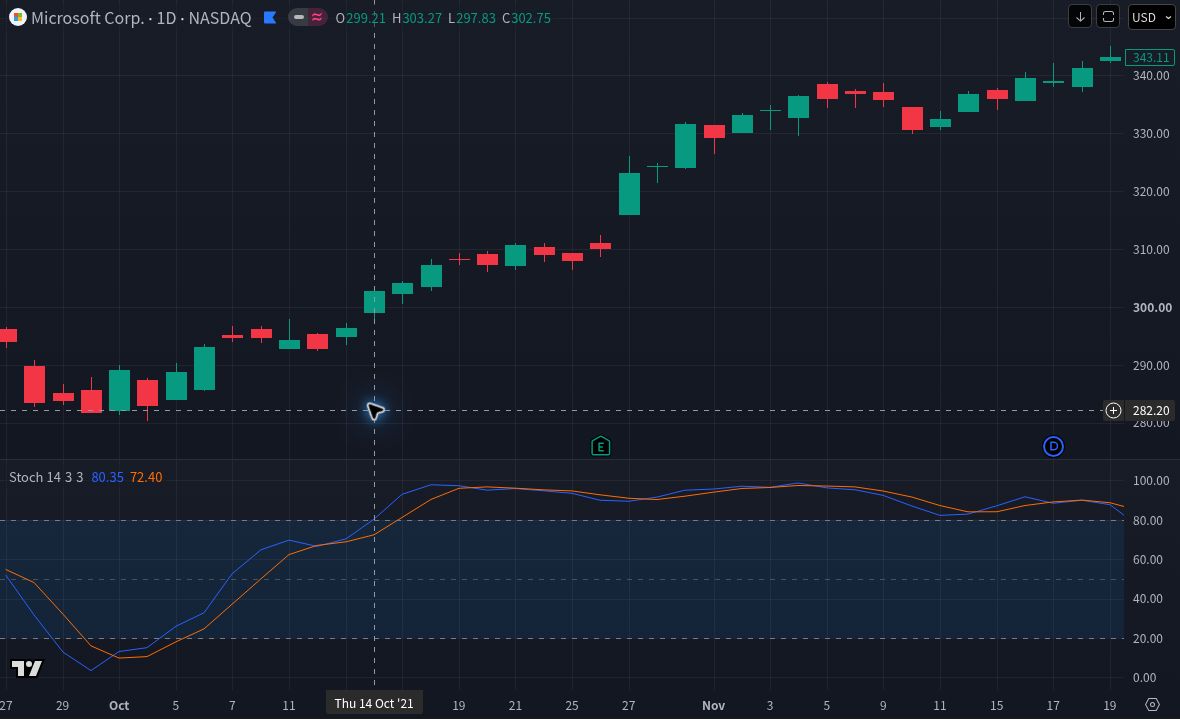
The narrow lesson is that the first high reading did not identify the end of this advance. It does not follow that every reading above 80 is a reason to buy. The later price path was unavailable on October 14, and Microsoft released quarterly results on October 26, 2021, inside the illustrated period. The oscillator cannot separate its own descriptive behavior from company news and wider market changes.
Example 2: An upward crossover did not prevent another decline
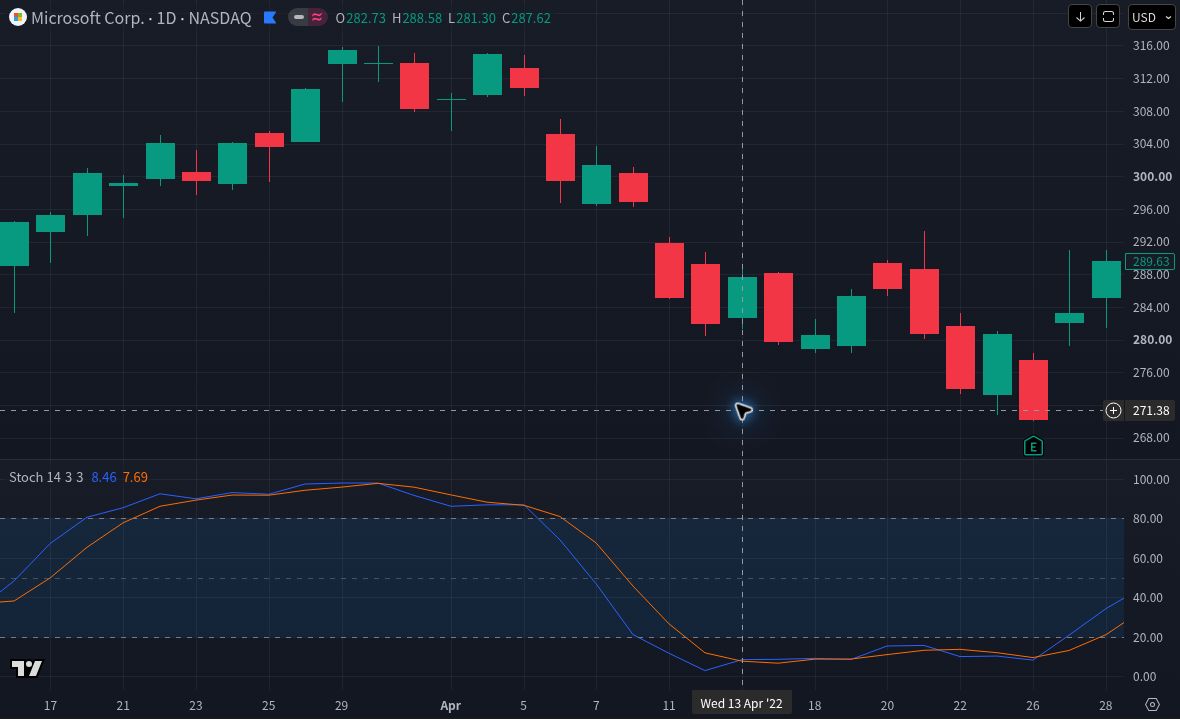
On April 12, 2022, the chart displayed %K of 2.93 and %D of 11.92. On April 13, the readings were 8.46 and 7.69: %K had crossed above %D, with both still below 20. MSFT’s April 13 close was $287.62.
| Observation | Date | Close | Price change |
|---|---|---|---|
| Next session | April 14 | $279.83 | −2.71% |
| Five sessions later | April 21 | $280.81 | −2.37% |
| Ten sessions later | April 28 | $289.63 | +0.70% |
The next-session decline shows why an upward crossover cannot guarantee an immediate reversal. The path was choppy, with closely spaced crossings rather than a clean, uninterrupted reversal. The later recovery also shows why a selected endpoint can change the story. Microsoft reported quarterly results on April 26, 2022, before the final observation. Do not attribute that recovery to the crossover.
These percentages compare closing prices only. They do not model a fill after the observation, a holding rule, dividends, fees, slippage, or taxes. A complete trading test would need those rules, a defined sample, and evaluation on data not used to choose the rules.
Historical chart and data-source note
Historical prices and indicator values above were read from TradingView’s ordinary chart display on October 25, 2026, with NASDAQ:MSFT requested, daily candlesticks, USD, dividend adjustment off, a linear price scale, and chart timezone Tokyo (UTC+9). Stochastic used %K Length 14, %K Smoothing 3, %D Smoothing 3, and indicator timeframe Chart. Percentages are simple changes between the displayed closing prices, rounded to two decimals.
The screen identified its live data source as “NASDAQ by Cboe One.” That label is not independent verification of the historical end-of-day vendor or of an official Nasdaq consolidated feed. TradingView explains its default US live-data source, and its data-feed documentation distinguishes end-of-day, intraday, and realtime feeds. Other feeds, adjustment choices, formulas, or chart modes can produce different readings.
The two price charts are static retrospective screenshots with later bars visible, not contemporaneous before-images. They preserve the TradingView logo and adjacent attribution; TradingView’s policies describe attributed snapshot use. No raw market-data file is supplied. The examples are descriptive educational displays, not a claim of predictive performance or TradingView endorsement.
Stochastic versus RSI and Stoch RSI
Stochastic starts with the closing price’s position within a high–low price range. RSI starts with smoothed upward and downward price changes. They can disagree because they summarize different features of the same price history. See our RSI guide for that separate calculation.
Stoch RSI applies a stochastic-style range calculation to RSI values instead of directly to price. It is a different indicator, not a more accurate version of Stochastic. Fidelity’s StochRSI explanation shows this extra calculation layer.
Adding all three does not create three independent confirmations. They share the same underlying price history. Start with one question and one oscillator; if another line does not change what you would investigate, leave it off the chart.
A practice routine that does not require a trade
- Fix the setup. Record the exact security, interval, data settings, and indicator inputs before looking for examples.
- Describe price first. Note the visible direction and an important prior high, low, or range. Keep the description specific to the dates shown.
- Record one completed-bar observation. Write the date, %K, %D, and the precise event: a level, a line crossover, or a chosen divergence.
- Separate observation from expectation. For example: “%K crossed above %D below 20; price has not recovered the previous low.” That is more informative than “buy signal.”
- Choose review dates before revealing later bars. Compare the full intervening path, not only a favorable endpoint. Keep examples that contradicted your expectation.
- Check company events. Use the earnings-calendar guide to find a reporting date, then confirm it with the issuer.
You can save these observations in an ordinary notebook. No order, paid indicator, or live alert is needed to learn the calculation. If you later want a reminder, our alerts guide explains why bar-close conditions and ordinary price alerts differ.
Questions beginners often ask
Are 14/3/3 the best settings?
They are the documented starting settings used here. “Best” needs a stated objective, instrument, timeframe, cost model, and independent evaluation. Adjusting the inputs until one historical chart looks convincing does not establish that they generalize.
Can the oscillator rise while the share price falls?
Yes. %K depends on a rolling range and one averaging step; %D adds the second. On April 14 in the example, %K edged from 8.46 to 8.64 even as the close fell. Read the components rather than treating the line as a daily-return chart.
Does a low reading mean a stock is cheap?
No. It describes recent price behavior. Assessing value requires business and financial evidence, such as the questions in our stock-analysis framework.
Takeaway: understand the range calculation, keep the settings reproducible, and use the two lines to describe what changed. Price context and a written observation are more useful than turning 80, 20, or a crossover into an instruction.
Method and official documentation reviewed October 25, 2026. Platform labels can change. Educational information only, not individualized investment advice or a recommendation to buy, sell, or hold a security. Investing involves risk, including loss of capital. Historical examples do not establish future performance.