
Read company financials, compare a few businesses, and take your questions back to the original reports
Disclosure: I use TradingView Premium and may earn a commission if you purchase a subscription through the affiliate link in this article.
TradingView can help you study a company’s revenue, profit, cash flow, financial position, and valuation ratios. A useful first session is small: choose one business, read several years of results, and write down one change that needs an explanation.
This guide focuses on TradingView’s fundamental-analysis tools in the English web interface. If you are still learning the platform controls, start with our TradingView setup guide. If ownership and shares are unfamiliar, read what a stock represents first. You can practice the research without buying a stock.
Not sure which tool to open? Use our financial-data tools guide to choose between statements, Fundamental Graphs, and Stock Screener.
Feature information checked against official TradingView documentation on October 12, 2026. The screenshots show the actual English web interface captured that day using a Premium account. They demonstrate the controls and are not a hands-on Basic-plan test. Company figures and quotes are historical snapshots, not current investment recommendations.
What fundamental analysis helps you investigate
Fundamental analysis examines the business behind a security: how it earns money, the resources and obligations supporting it, and the assumptions needed to estimate value. Financial statements supply the numbers; company reports explain their context. TradingView’s introduction to fundamental analysis covers both numerical and qualitative research.
Keep three questions beside the screen:
- Is the business growing, and what is driving that growth?
- Does accounting profit translate into cash, and how much reinvestment is needed?
- What expectations might the share price already reflect?
A rising revenue chart or a low valuation multiple starts an investigation. You still need to examine competition, risks, accounting choices, and future assumptions before reaching an investment conclusion.
1 Open one company’s financial statements
Search for a familiar company and confirm its name, ticker, exchange, and share class. Open its public company page, then choose Financials → Statements. In the interface demonstrated here, the statement choices are Income statement, Balance sheet, and Cash flow.
For example, Apple’s public financial-statement page provides a way to locate these controls. Apple is used only to demonstrate the interface. Choose your own research company after checking its listing.
- Select Income statement and begin with Annual.
- Read the fiscal dates above the columns and the displayed currency.
- Find revenue and operating income, then compare several completed years.
- Move to the balance sheet and cash-flow statement to investigate how that performance was funded.
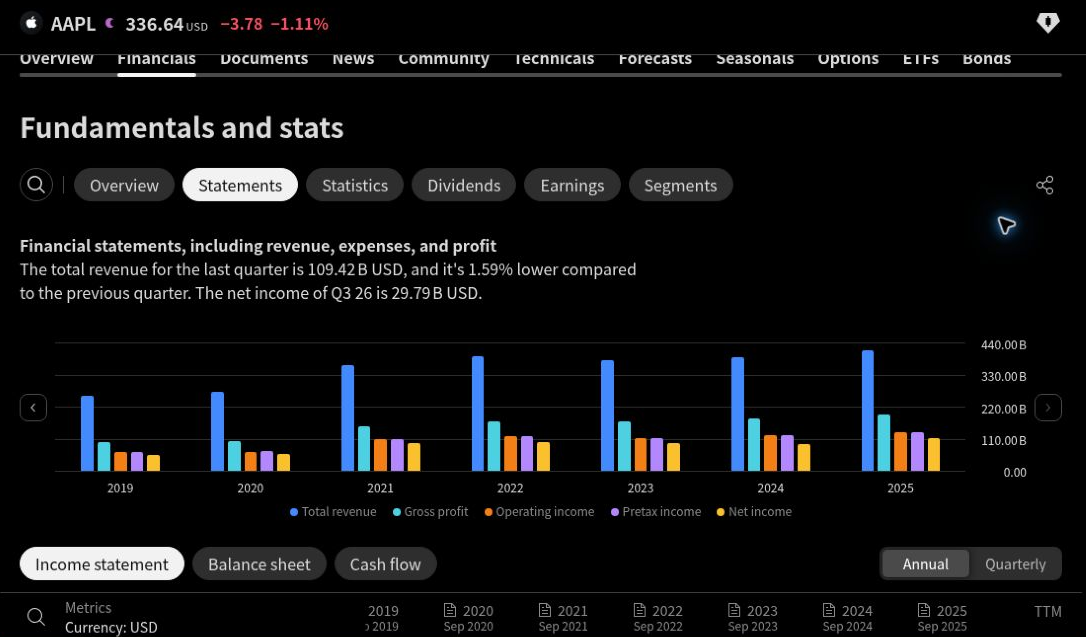
Swipe or scroll horizontally to inspect the controls. Open the full-size screenshot.
2 Read the three statements together
Each statement answers a different question. An income statement covers performance over a period; a balance sheet describes a position at a date; a cash-flow statement explains cash movements over a period. The SEC’s financial-statement introduction explains how they connect.
Income statement: sales and profitability
Revenue is the sales generated during the reporting period. Begin with the direction over several years, then ask whether the change came from higher volume, prices, acquisitions, or currency effects. The headline number alone does not supply that explanation.
Operating income shows profit from operations before interest and income taxes. Net income includes additional items such as financing and tax effects. Compare both with revenue to see whether growing sales are accompanied by improving profitability.
For a simple, hypothetical example, revenue rising from $1,000 million to $1,100 million is 10% growth. If operating income rises from $120 million to $121 million, operating margin falls from 12% to 11%. Sales improved, but less operating profit was earned per dollar of sales. That is a question to take to management’s discussion, rather than an automatic buy or sell signal.
Earnings per share, or EPS, expresses earnings on a per-share basis. Read whether the field is basic or diluted. Diluted EPS accounts for potential dilution under its calculation; TradingView publishes its diluted-EPS definition. Review the share-count trend as well as company-wide profit.
Balance sheet: resources and obligations
Look at cash, debt, assets, liabilities, and shareholders’ equity at the reported date. Liabilities include more than interest-bearing debt. Compare debt with the company’s cash generation, and use the filing to check maturity dates and borrowing terms.
Do not add four quarterly cash or debt balances to create an annual total. They are snapshots. A high cash balance also needs context: some cash may be required to run the business or subject to restrictions.
Cash flow: cash generated and cash used
The cash-flow statement separates operating, investing, and financing activities. Begin with operating cash flow, then inspect spending on long-lived assets and financing movements. Borrowing can increase cash without showing that the operating business is generating it.
TradingView defines free cash flow as cash from operating activities minus capital expenditures for fixed assets. For a hypothetical company with $160 million of operating cash flow and $50 million of such expenditure, this calculation gives $110 million of FCF. Use the positive magnitude of a capex cash outflow so you subtract it only once.
Compare several years and investigate large changes. Working capital, taxes, or unusually low investment can affect one period. Our free cash flow guide explains the calculation and the cash uses that may remain.
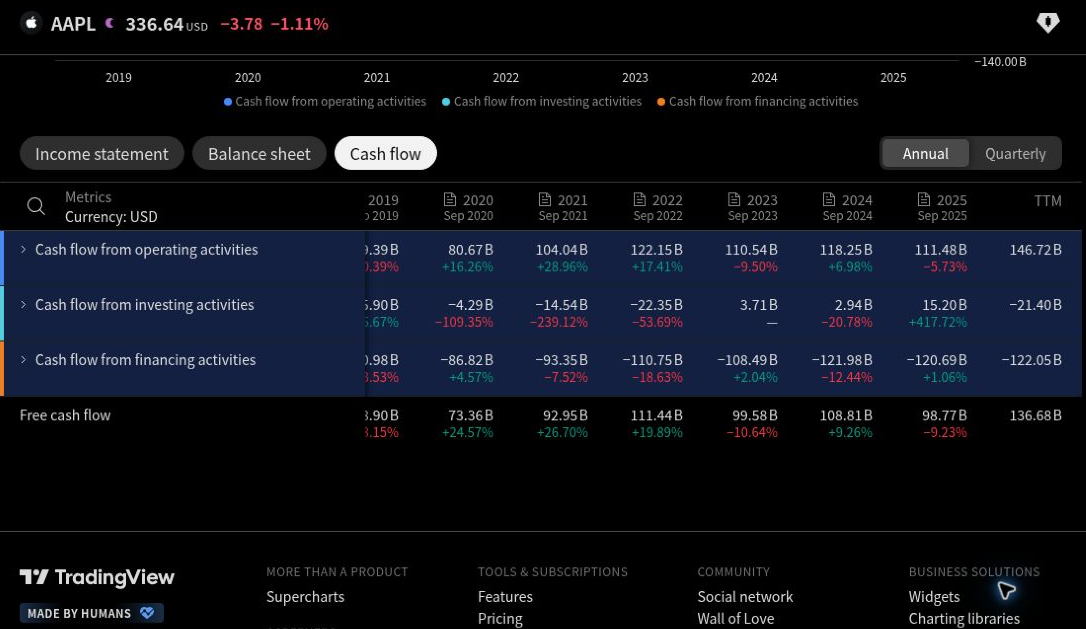
Swipe or scroll horizontally to read the table. Open the full-size screenshot.
3 Match the period, currency, and units
- Annual or FY: a completed fiscal year. Its year-end may differ from December.
- Quarterly or FQ: a fiscal quarter. Seasonal businesses often need comparison with the same quarter a year earlier.
- TTM: trailing twelve months, a rolling year of historical results. It is not a forecast or necessarily the same period as the latest completed fiscal year.
TradingView supports different financial reporting periods, but availability varies by field and company. Some companies report half-yearly rather than quarterly, so a missing quarterly field can reflect reporting frequency. See the quarterly-data explanation. A blank value is not zero.
Also read the growth basis. TradingView’s revenue-growth definition distinguishes Annual YoY, Quarterly YoY, TTM YoY, and Quarterly QoQ. YoY compares with a year earlier; QoQ compares with the preceding quarter. A column labeled “Change %” should not automatically be read as YoY growth.
Write down currency and scale before copying a figure. USD 0.4 billion is USD 400 million. Keep EPS in currency per share, and distinguish a total cash amount from a margin percentage or per-share field.
In Stock Screener, certain financial values can be converted to another display currency. The quoted last price does not necessarily change with them. TradingView’s currency-conversion guide illustrates this distinction. A displayed currency label is no substitute for checking the original filing’s currency and units.
4 Use financial charts to see the trend
On the demonstrated company statement page, selecting the Free cash flow row opens a dedicated metric chart. It makes year-to-year variation easier to see. Check the period and the metric definition before interpreting a taller bar as an improvement.
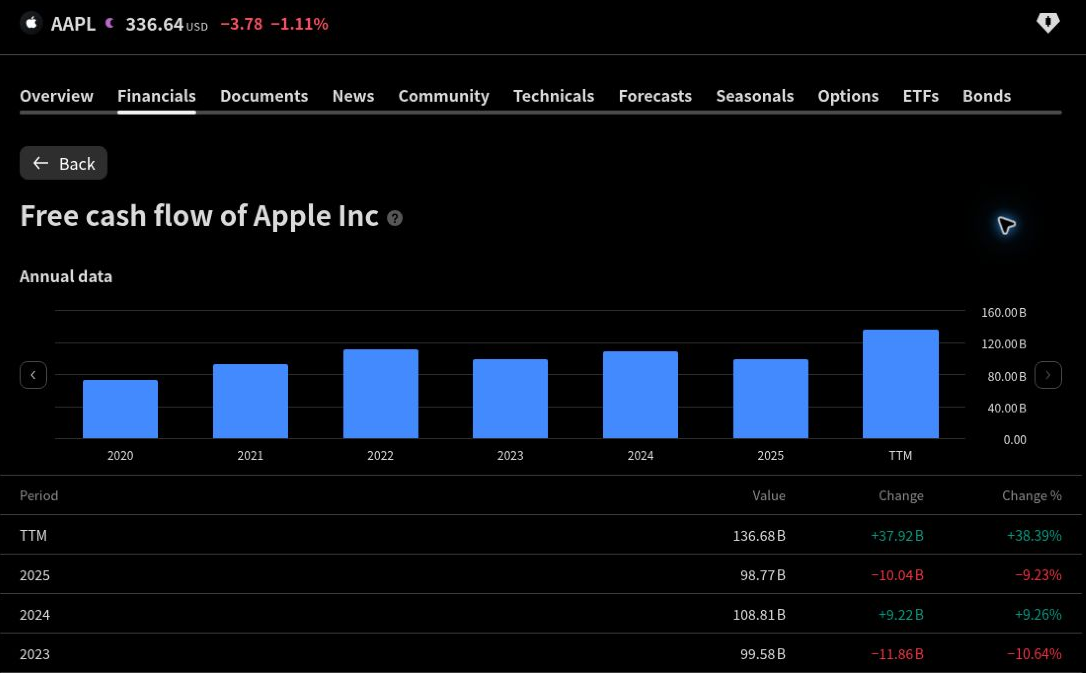
Swipe or scroll horizontally to inspect the chart. Open the full-size screenshot.
You can also add financial data to Supercharts. Open Indicators, metrics, and strategies in the upper toolbar and look for the financial or fundamental category. TradingView’s financial-data guide calls it Financials; its current Supercharts tour uses Fundamentals. Interface wording can change.
Select one built-in metric, such as revenue or operating cash flow, and check its reporting-period setting. Start with one series at a time. Changing the price chart to daily candles does not turn annual revenue into daily revenue. The metric’s reporting period and the price chart’s candle interval answer different questions.
For peer comparisons, the separate Fundamental Graphs tool lets you select companies and financial metrics. TradingView’s official walkthrough explains its comparison views and scale controls. Compare similar businesses using the same period and definition. A larger company’s higher dollar revenue alone says little about profitability or growth.
5 Build a small Stock Screener comparison
Once you understand one company, open Stock Screener to compare a wider group. Use it to produce a manageable research list.
- Choose the universe. Start with one market and a familiar non-financial industry. Check the security type. The Primary listing option can reduce duplicate secondary listings.
- Add a few columns. Use revenue growth, operating margin, operating cash flow or FCF, debt, and P/E as questions to investigate.
- Check each period. Open the column settings when you need another reporting interval. Keep the comparison consistent.
- Apply a simple practice filter. For example, try positive revenue growth over the selected period and positive FCF over a consistently available period. Keep only a few matches for reading.
These controls are explained in the Stock Screener guide. The screeners walkthrough covers configurable columns, sorting, and financial-currency settings. Check the field name carefully: Free cash flow, FCF growth, FCF margin, and FCF per share describe different things.
The practice filters above have not been backtested for this article. They can exclude growing businesses investing heavily or companies recovering from a difficult year. Banks and insurers need a separate framework because their funding and capital requirements differ; avoid applying an industrial-company cash-flow screen mechanically.
6 Read the definition behind each ratio
P/E compares price with an earnings measure
TradingView’s published P/E formula uses price per share divided by diluted EPS for the trailing twelve months. A forward P/E uses predicted earnings. Keep historical results and estimates separate.
A low multiple can reflect risks or an earnings peak; a high multiple can reflect optimistic growth assumptions. Zero, negative, or unusually small earnings also make a simple P/E comparison unhelpful. Compare industry peers and investigate the earnings behind the ratio.
TradingView ROIC uses a different numerator from our operating framework
For a deeper profitability review, you may encounter return on invested capital, or ROIC. TradingView’s published definition is net income divided by average total invested capital for two periods, expressed as a percentage. It says the field is empty when the denominator is negative.
Our operating ROIC guide uses net operating profit after tax, or NOPAT, divided by average invested capital. Those formulas can produce different values. Do not copy TradingView’s ROIC into a NOPAT-based comparison without reconciling both the numerator and the invested-capital definition.
Beginners can leave ROIC out of the first screen. Understanding revenue, profit, cash generation, and debt is already a useful start.
7 Verify important figures in the company reports
TradingView explains that its provider standardizes financial data from primary company reports. Standardized figures can differ from the company’s own presentation. Reconcile a material difference before using the number in a valuation.
Check the period end, publication date, and latest available report. A “latest” financial figure may describe a period that ended months earlier. A refreshing quote or screener table does not mean a new financial statement has arrived. This guide does not assume a fixed update delay after every earnings release.
Earnings and revenue estimates or adjusted figures also require care. TradingView offers non-GAAP earnings/revenue data and forecasts alongside statement information. Check the accounting basis and any reconciliation before comparing an earnings-release figure with a statement field.
For a U.S. domestic reporting company, use the latest 10-K and later 10-Qs. For another issuer, use its relevant annual and interim reports. Our 10-K reading checklist points to the business description, management discussion, risks, statements, and notes.
Keep a short research record:
- Company, listing, metric, reporting period, currency, and units
- The source report and its publication date
- The definition or adjustment used
- What changed and management’s explanation
- The question you still need to answer
FCF deserves an extra check. The SEC’s non-GAAP guidance, Question 102.07, notes that free cash flow has no uniform definition. A company’s adjusted FCF may use different deductions. Mandatory debt payments and other cash uses can remain after the displayed FCF calculation.
Do you need a paid TradingView plan?
Start with the free Basic plan and the tools available in your account. The official plan comparison distinguishes allowances for financial metrics on a chart and historical financial data. Paid plans offer more simultaneous financial metrics and longer annual chart history than Basic, according to the comparison checked on October 12, 2026.
Consider paying only after naming the specific limit that interrupts your research. Replacing one chart metric with another or checking older filings directly may be sufficient. A subscription cannot create a missing company report, remove accounting differences, or make an estimate certain. Recheck current features and limits before subscribing.
You can open TradingView to try this company-research workflow. I may earn a commission if you purchase a subscription. Choose a plan for the features you need.
Your first research session is complete when
You can identify the company, explain one financial trend, distinguish FY from TTM, and find the primary report needed to check your observation. You do not need a complicated screen or a valuation conclusion in the first session.
A plain spreadsheet or notebook is enough to keep your record. If you prefer a ready-made structure, the optional SML Earnings Check workbook organizes manually entered quarter-by-quarter results and source notes. It does not import TradingView data or calculate a valuation.
If your next question is how assumptions affect value, begin with the free DCF valuation guide. The optional DCF Comparison Workbook compares manually entered scenarios. Its FCFF, or free cash flow to the firm, input is not automatically the same as TradingView’s operating-cash-flow-minus-fixed-asset-capex figure. Reconcile the cash-flow definition, financing effects, and required reinvestment before moving to valuation.
For notifications after you have a clear review condition, use the separate TradingView alerts guide. An alert can bring you back to the research; the investment decision still requires the business evidence.
Browse all TradingView guides for more practical platform lessons.
Educational content only. This article is not personalized investment advice or a recommendation to buy or sell any security. Investing involves risk, including possible loss of capital.